

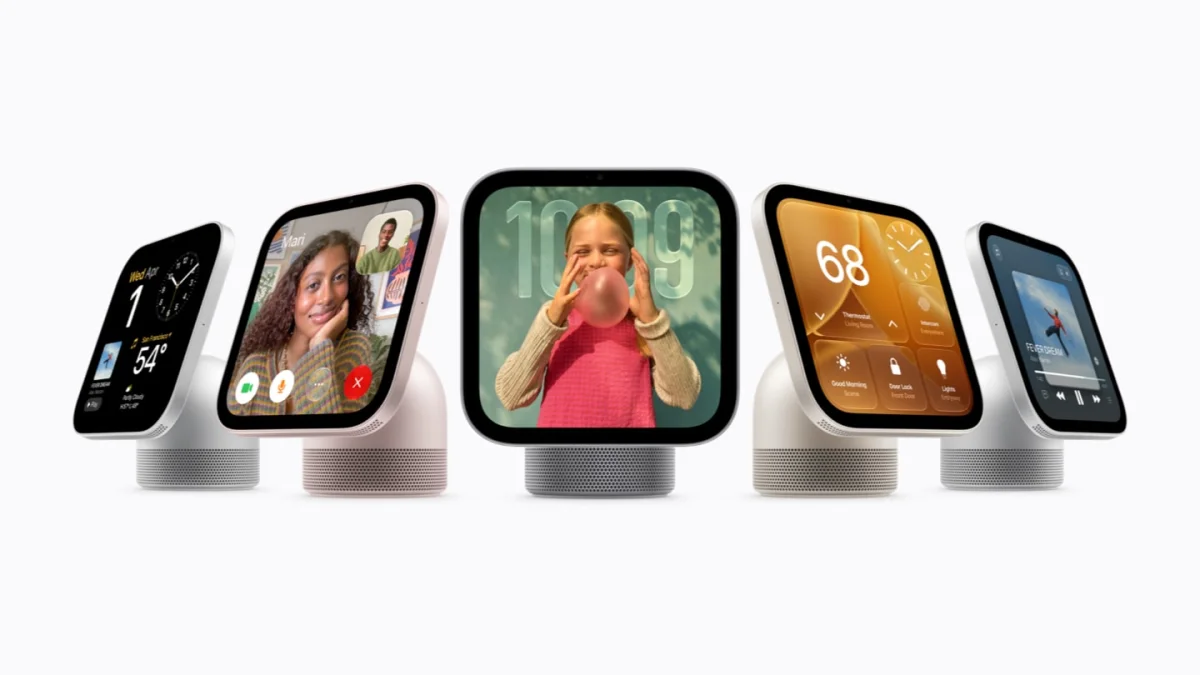
Apple HomeView is worth considering if your parents already enjoy Apple devices and want a shared screen for everyday life. Before buying, check whose device will support its personal features, where it will sit, and whether your parents actually want those features.
Apple announced HomeView on October 13, 2026, with U.S. pricing of $299 and availability beginning November 13. This is a buying analysis based on Apple's published information, not a hands-on review.
Your parents' age doesn't tell you how comfortable they are with technology. Their habits do. Start with what they already use and what they'd like to make easier.
A quick fit check for your parents' home
Use this table to decide what to investigate together. These are shopping judgments, not results from product testing.
| Household situation | What to check before buying |
|---|---|
| Parents happily use an iPhone or iPad | Whether their exact device supports the experience they want |
| They want a screen for family calls and kitchen tasks | Whether calls, text, and controls feel comfortable at the intended distance |
| They mainly want fresh family photos | Whether a simpler photo frame would meet the need |
| You plan to manage everything from another city | Which setup and recovery tasks require someone at home |
| They don't want a camera in the room | Whether the device fits their preferences at all |
| They prefer another language | Current support for their language and region |
If you're still choosing the category, our digital photo frame versus smart display guide helps separate a photo-sharing gift from a broader household device.
Check the parents' devices, not just yours
HomeView setup requires a compatible iPhone or iPad. Its personal-context features additionally require a paired Apple Intelligence-enabled device, with Siri AI enabled and a supported language. Apple's announcement also describes Siri taking action across apps; its assistance extends beyond answering questions. Apple's requirements and announcement explain these distinctions.
That matters when the person buying the gift lives elsewhere. Your newer phone shouldn't be the basis for assuming your parents will get the same experience. Write down their exact device model, software version, account, and preferred language. Ask Apple to confirm the specific tasks that combination supports.
There is a separate condition for personal content: Apple's product page says the paired device must be on the same Wi-Fi network and recently unlocked, and HomeView must recognize the user by face. Apple's HomeView FAQ also distinguishes personalized access from guest use.
Ask for a demonstration of what happens when the phone is upstairs, locked for a while, or away from home. This is a practical question about the routine your parents will follow, rather than a reason to rule the device out.
Choose the spot before choosing the model
HomeView has a seven-inch touchscreen, a camera, and FaceTime support. Apple's specifications list accessibility options including VoiceOver, Zoom, and Type to Siri, and state that wired power is required. The wall-mounted version needs separately purchased mounting and power equipment. Apple's technical specifications are the starting point for checking the room.
Measure the proposed spot. Can your parents reach it while seated? Will a window reflect on the screen? Does the cable cross a working surface? A wall installation commits to a viewing height; a tabletop placement makes it easier to try different locations.
When an in-person demonstration is available, let your parents lead. Have them read a calendar entry, find a control, ask a question in their usual voice, and correct a misunderstood request. Try the accessibility settings relevant to them. A feature list can't establish whether the combination feels comfortable.
Also consider what the device adds to an existing routine. If they already love video calls on an iPad, a fixed screen needs a clear benefit to earn its place.
Agree on setup and support before giving it
Make a short support agreement together: who handles initial setup, who helps when something stops working, and what your parents want to learn themselves.
Walk through recovery questions before purchase. What happens after a router change, a forgotten password, or a replacement phone? Can your parents get back to their favorite task, and when would someone need to visit? Don't assume a connected device can be fully maintained remotely.
Keep the first setup small. Add the activities they chose, leave a plain-language note about how to reach them, and arrange a follow-up after they've had time alone with it. Ask what felt useful and what felt like extra work.
The same approach helps with conversation: our guide to family check-ins that feel less like a status meeting offers ways to make follow-up feel relaxed.
Treat privacy as a household decision
Apple describes per-person content separation and protected processing of camera and microphone data. Those are relevant safeguards, but your parents should still decide what belongs in the room. Apple's privacy explanation describes its approach.
Discuss the camera's placement, who will be added to the home, which information should appear, and what guests might see. Ask your parents to show you how they'd stop an interaction or change a setting. Use our digital photo frame privacy checklist to structure the wider discussion about accounts, sharing, and removal of access.
For important actions, ask to see the exact confirmation flow before relying on it. Agree which changes should require your parents' explicit approval. Buying or setting up the device doesn't give a family member permission to expand access later.
Budget for the routine you actually want
Look beyond the hardware price. List any desired subscriptions, accessories, installation, and possible paired-device upgrade. Apple's announcement notes subscriptions for some services, daily limits for certain server-based Intelligence features, and future paid expanded access without a stated price. Read the announcement's footnotes before treating the purchase price as the full long-term cost.
Ask what still works if an optional service is canceled. Our subscription versus no-subscription guide provides a useful way to separate essential use from optional extras.
Three household profiles to consider
An Apple-comfortable couple who cook and call family: HomeView deserves a demonstration focused on their existing habits. Ask each person to try it independently.
A parent who wants photos without another device to learn: Compare the photo experience first. A wider set of functions has value only if the parent wants to use it.
A household starting from scratch: Price the complete setup and identify a support person before committing. Consider introducing one new routine at a time.
Before paying, ask your parents to complete their three chosen tasks, confirm device compatibility with Apple, and review the seller's return terms. The strongest reason to buy is that they enjoyed using it and want it at home.
Frequently asked questions
Can someone use HomeView without their own iPhone?
Yes, for some activities. Apple says guests can use functions such as timers, weather, music, and smart-home control without accessing personal information. Setup and a full personalized experience have additional requirements. Apple's FAQ explains the difference.
Should I preorder it as a surprise gift?
Involve your parents first. A screen with a camera, account connections, and a permanent place in their home is a personal choice. If you're uncertain, wait until they can try it and check the purchase terms.
How do I know if it will reduce tech-support calls?
You can't establish that from launch materials. Watch your parents perform the tasks they care about, including recovering from a mistake. Ease of recovery matters as much as a successful demonstration.
Publisher disclosure: HeyBondi sells an upcoming smart photo frame with a personal assistant, with estimated shipping in December 2026. We have not tested it against HomeView.